
CodeB Wallet · Web · EU Digital Identity
Your European digital identity.
In your browser.
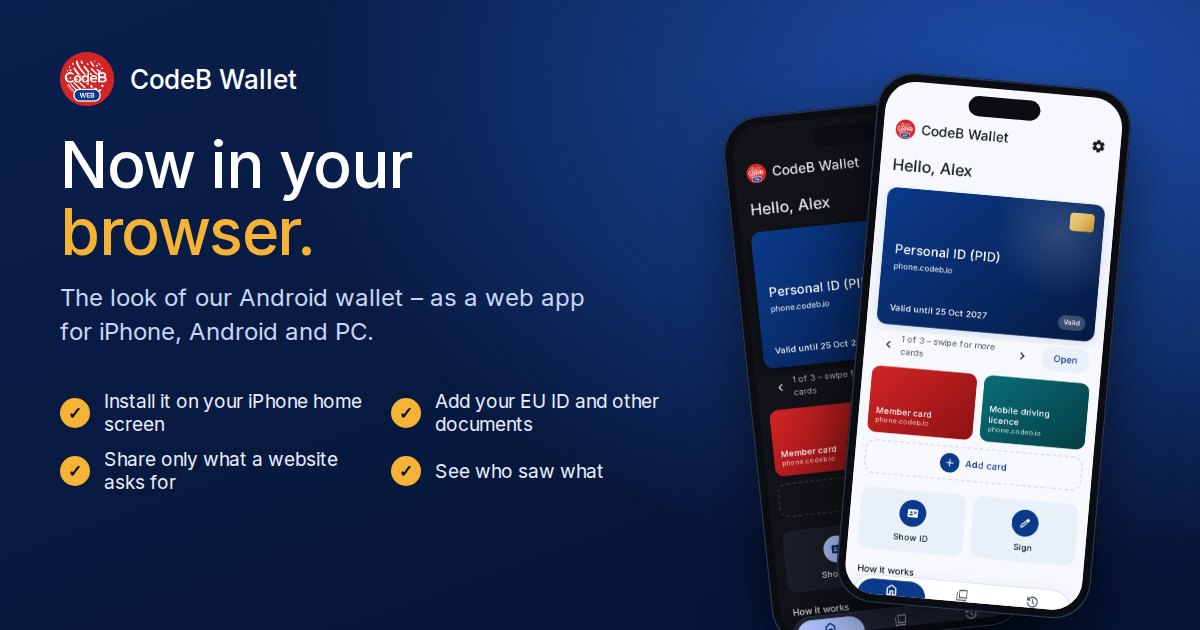
The CodeB Wallet also runs in your browser: no app store, no download. Add your digital ID (PID) and other attestations of the European Digital Identity (EUDI) framework, share only what a verified website asks for, and see every use in your history. On iPhone and Android it installs to the home screen like an app.
OpenID4VCI 1.0 · OpenID4VP 1.0 · DCQL · SD-JWT VC · ISO mdoc · DPoP · EU trusted lists · Token Status List
Sign in with your CodeB account. Runs in current versions of Safari, Chrome, Edge and Firefox.
In short
- What
- The CodeB Wallet for the European Digital Identity (EUDI) framework under eIDAS 2.0, as a web app (PWA).
- Runs on
- iPhone and iPad, Android phones and tablets, Windows, macOS and Linux computers – in the browser or installed to the home screen.
- Holds
- Your PID (person identification data) and attestations such as membership cards, the mobile driving licence or a proof of age, in SD-JWT VC and ISO mdoc formats.
- Shares
- Only the claims a website asks for and you confirm, encrypted to that website, and only with websites on a trusted list.
- Your data
- Stays in your browser. Keys are created by the browser and cannot be exported; the server never sees what you hold.
- Made by
- Aloaha Limited, Malta – the same team that builds the CodeB Wallet Android app and the CodeB issuer and verifier.
How it works
Four steps, the same as in the app.
Open and sign in
Open CodeB Wallet in the browser and sign in with your CodeB account. The wallet belongs to that account; nobody else on the same browser sees it.
Add your PID
Choose Add document and pick your PID from the list, or scan the QR code an issuer shows you. You confirm the issuer and the documents before anything is added.
Share only what is asked
When a website shows a QR code, scan it. The wallet shows who is asking, whether they are verified, why they ask and exactly which details – you share or decline.
See who saw what
Every use is in your history: which website, when and which details. One tap asks that website to delete your data.
Why it is safe
Only trusted websites
A website must hold an access certificate from a trusted list: the EU lists, plus CodeB’s own test list, which you can switch off in Settings. Untrusted websites are blocked, with no way to override.
Only what is needed
Selective disclosure: the wallet sends only the claims the request names, for example “over 18” instead of your date of birth.
Encrypted answers
Answers are encrypted to the website that asked (direct_post.jwt). Nobody in between, not even our server, can read them.
One-time copies
Your PID comes as a batch of copies with separate keys; each copy is shown once, so different websites cannot link your visits.
Revocation checked
Documents are checked against their issuer’s status list. A revoked document is marked and never shared.
Sovereign by design
Built and operated in the EU by Aloaha, self-hostable, no tracking pixels and no analytics beacons.
Install it as an app
Installed, the CodeB Wallet opens from your home screen in its own window. The icon carries a small “WEB” badge, so you can tell it from the Android app if you have both.
iPhone and iPad (Safari)
- Open the web wallet in Safari.
- Tap the Share button.
- Choose Add to Home Screen, then Add.
- Open CodeB Wallet from the home screen and add your documents there.
Android (Chrome, Edge)
- Open the web wallet.
- Tap Install app in the page or in the browser menu.
- Confirm with Install.
Computer (Chrome, Edge)
- Open the web wallet.
- Click the install icon in the address bar or Install CodeB Wallet as an app.
On iPhone, the installed app and Safari keep separate storage. Install first, then add your documents in the installed app.
Web wallet or Android app?
| CodeB Wallet in the browser | CodeB Wallet Android app | |
|---|---|---|
| Devices | iPhone, Android, computers | Android phones |
| Installation | None, or “Add to Home Screen” | App |
| Add documents (OpenID4VCI) | Yes | Yes |
| Share online (OpenID4VP) | Yes | Yes |
| In person (Bluetooth, NFC) | No | Yes |
| Read a passport or ID card chip | No | Yes (NFC) |
| Where keys are kept | In the browser, not exportable | Phone keystore, hardware-backed |
| History, deletion requests | Yes | Yes |
For keys kept in your phone’s secure hardware, and for showing your ID in person, use the Android app; for quick access on any device use the browser.
Questions and answers
What is the CodeB web wallet?
It is the CodeB Wallet for the European Digital Identity (EUDI) framework as a web app. It runs in the browser on iPhone, Android and computers, and installs to the home screen like an app. It holds your PID and other attestations and shares them with verified websites.
Do I need to install anything?
No. Open phone.codeb.io/web-wallet.html and sign in. If you like, add it to your home screen: on iPhone with Safari via Share > Add to Home Screen, on Android and computers with Install app.
Does it work on iPhone?
Yes. The CodeB web wallet runs in Safari on iPhone and iPad and can be added to the home screen. QR codes are read with the camera in the wallet itself.
Which documents can I add?
Your PID (person identification data) and attestations such as membership cards, a mobile driving licence or a proof of age, in SD-JWT VC and ISO mdoc formats, from the CodeB issuer and other OpenID4VCI 1.0 issuers.
Which websites can see my data?
Only websites with an access certificate from a trusted list (the EU lists, plus CodeB's own test list, which you can switch off in Settings), and only the details they ask for after you confirm. Untrusted websites are blocked.
Where is my data stored?
In your browser on your device. Keys are created by the browser and cannot be exported. The server does not keep a copy of your documents.
What is the difference to the Android app?
The web wallet adds documents and shares them online like the app. In-person sharing by Bluetooth or NFC, chip reading and hardware-backed keys need the CodeB Wallet Android app.
Can I ask a website to delete my data?
Yes. Every use is listed in the history with the website's contact details; one tap prepares a deletion request under Article 17 GDPR.
Which standards does it use?
OpenID4VCI 1.0 to add documents (with PAR, PKCE, DPoP and batch issuance), OpenID4VP 1.0 with DCQL and encrypted answers (direct_post.jwt) to share them, SD-JWT VC and ISO mdoc as formats, the EU trusted lists for verifiers and the Token Status List for revocation.
Is the CodeB web wallet certified?
No. It follows the EUDI standards but is not a certified EUDI Wallet. If you want the keys kept in your phone's secure hardware, use the CodeB Wallet Android app.
Try it now
Sign in, add your PID from the list and share it with a verified website.