Show CodeB Wallet the same way everywhere.
When your website or counter asks people to prove something, add a document or sign with CodeB Wallet, use these buttons, QR code frames and the NFC reader sticker. People see the same signs everywhere and know what happens next. Everything here is free to use for websites and places that work with CodeB Wallet.
Three rules. 1. One button per action, with the fixed label below. 2. On a computer, show the QR code in the frame and keep the typed link under it. 3. Tell people the result in plain words: Waiting, Done or Not completed.
Buttons
Navy for light backgrounds, white with a navy outline for dark backgrounds. The red round mark always sits on the left. The label is fixed per action and language:
 Verify with CodeB WalletAdd to CodeB WalletSign with CodeB WalletOpen CodeB Wallet
No CodeB Wallet? Get it on Google Play
Verify with CodeB WalletAdd to CodeB WalletSign with CodeB WalletOpen CodeB WalletNo CodeB Wallet? Get it on Google Play
| Action | English | German | Maltese | Link on a phone |
|---|---|---|---|---|
| Verify | Verify with CodeB Wallet | Mit CodeB Wallet nachweisen | Ivverifika b’CodeB Wallet | myeuid.app/open/verify |
| Add a document | Add to CodeB Wallet | Zu CodeB Wallet hinzufügen | Żid ma’ CodeB Wallet | myeuid.app/open/add-document |
| Sign | Sign with CodeB Wallet | Mit CodeB Wallet signieren | Iffirma b’CodeB Wallet | myeuid.app/open/sign |
| Open the wallet (no action of its own, e.g. a reading session) | Open CodeB Wallet | CodeB Wallet öffnen | Iftaħ CodeB Wallet | the link of your request |
- Height 56 px; never below 48 px. Corner radius 12 px. Keep 28 px of clear space around the button.
- Do not recolour, stretch, crop or re-letter the button, and do not put the mark on another button.
- On a phone the button opens CodeB Wallet: use the link of your request (for example
openid4vp://,openid-credential-offer://) or the App Link in the table. - Next to the button: No CodeB Wallet? Get it on Google Play.
QR code frame
On a computer people scan the code with CodeB Wallet. The frame says what the code is for; the code itself always sits on white. Use the navy frame on screens and the white frame with a navy outline on paper.
Scan with CodeB WalletNo camera? Open on this phone:myeuid.app/open/verify
Scan with CodeB WalletNo camera? Open on this phone:myeuid.app/open/verify
- The code is at least 200 px wide on screens and 30 mm on paper.
- Keep the typed link under the code, for people whose camera does not scan.
- Header: Scan with CodeB Wallet (verify, sign) or Scan to add to CodeB Wallet (add a document).
- Keep a white margin (quiet zone) around the code: at least 4 modules on paper, 2 on screens.
- The button and the QR code carry your request. The typed link only opens the matching place in CodeB Wallet; it never carries the request.
Showing the result
While the wallet is busy and afterwards, say what happened in plain words. No error codes on the page.
- Waiting The request is open; the person confirms it in CodeB Wallet.
- Done The wallet answered and your website accepted the answer.
- Not completed The person declined, the time ran out or the answer did not pass your checks. Offer to try again.
NFC reader sticker
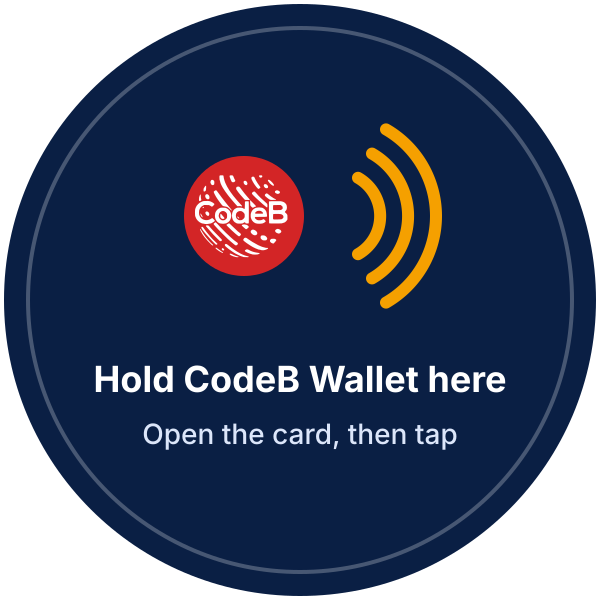
Put the sticker on or right next to the NFC reader at a door, gate or counter, so people know where to hold the phone. Print it at 40 mm (small readers) or 60 mm (wall readers).
HTML for your page
With the images from the kit (no font needed):
<a href="https://myeuid.app/open/verify">
  <img src="button-verify-navy-en.svg" height="56" alt="Verify with CodeB Wallet">
</a>
<p>No CodeB Wallet? <a href="https://play.google.com/store/apps/details?id=com.codeb.wallet">Get it on Google Play</a></p>
Or as a styled link: copy codeb-wallet-touchpoint.css and the font inter-semibold-latin.woff2 to your own server (the font is Inter, SIL Open Font License).
<link rel="stylesheet" href="/css/codeb-wallet-touchpoint.css">
<a class="cbw-btn" href="https://myeuid.app/open/verify">
  <img src="codeb-wallet-mark.svg" alt="" width="32" height="32"><span>Verify with CodeB Wallet</span>
</a>
Download the kit
All texts in the files are converted to outlines, so they look the same on every computer.
- codeb-wallet-kit.zip – Everything below in one ZIP file
buttons/– Buttons: verify, add, sign, open × navy, white × English, German, Maltese (SVG, PNG 1x, 2x, 3x)qr-frames/– QR code frames for screen and print in English, German and Maltese, with an empty code area (SVG, PNG)nfc-sticker/– NFC reader sticker in English and German (SVG, PNG, print PDF at 40 and 60 mm)- codeb-wallet-mark.svg – The red CodeB mark (SVG)
CodeB Wallet for Android is in a closed test phase.
Questions
Which label do I put on the button?
One fixed label per action: Verify with CodeB Wallet, Add to CodeB Wallet, Sign with CodeB Wallet or, without an action of its own, Open CodeB Wallet (German: Mit CodeB Wallet nachweisen, Zu CodeB Wallet hinzufügen, Mit CodeB Wallet signieren, CodeB Wallet öffnen; Maltese: Ivverifika b’CodeB Wallet, Żid ma’ CodeB Wallet, Iffirma b’CodeB Wallet, Iftaħ CodeB Wallet).
Where does the button link to?
On a phone, to the link of your request (for example openid4vp:// for a presentation or openid-credential-offer:// for a credential offer), or to the App Link myeuid.app/open/verify, /add-document or /sign. On a computer, show the same link as a QR code in the frame.
How big must the QR code be?
At least 200 px wide on screens and 30 mm on paper, always on white, with the typed link under it.
Can I change the colours, the font or the label?
No. Use the navy button on light backgrounds and the white button with a navy outline on dark backgrounds, with the label from the table. The files in the kit have the text converted to outlines, so no font is needed.
Is the kit free to use?
Yes, for websites and places that work with CodeB Wallet. The font in the CSS version is Inter under the SIL Open Font License.
Where do people get CodeB Wallet?
On Google Play for Android. CodeB Wallet for Android is in a closed test phase.
Last updated: