Copy the address
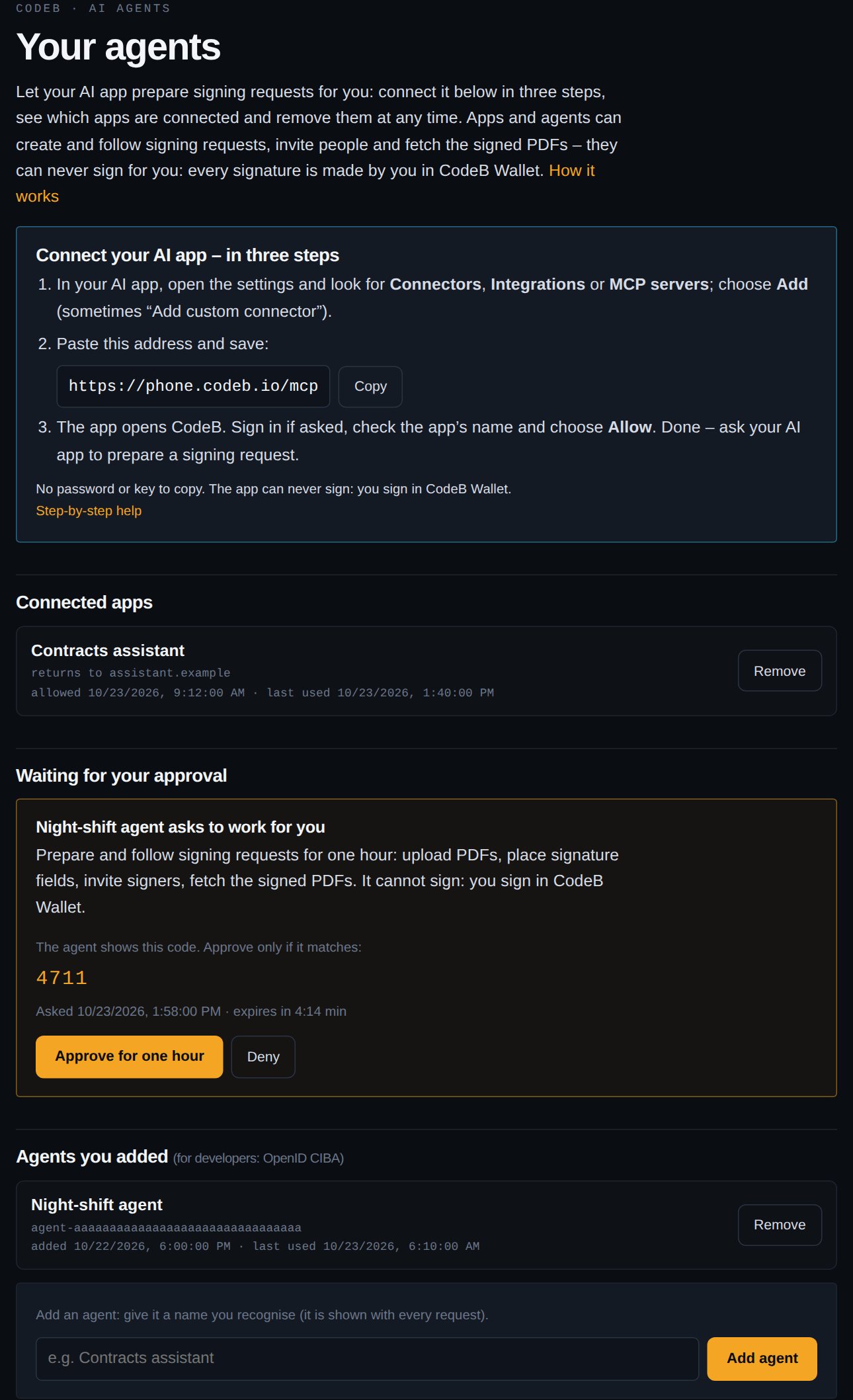
Copy https://www.aloaha.com/mcp. You also find it, with a Copy button, on Your agents.
AI agents · MCP · OpenID CIBA
Your AI app drafts the contract, places the signature fields and invites the signers. Connecting takes one minute: paste one address into the app and choose Allow – no password, no key, nothing technical. Every signature is still made by you and your signers in CodeB Wallet.
CodeB’s MCP server lets an AI app or agent create, send and track PDF signing requests for you. It cannot sign: every signature is an advanced or qualified electronic signature (PAdES) made by a person in the EUDI wallet.
Model Context Protocol · OAuth 2.1 + PKCE · OpenID CIBA Core 1.0 · RFC 9728 · PAdES · EUDI wallet
Copy https://www.aloaha.com/mcp. You also find it, with a Copy button, on Your agents.
In your AI app open the settings and look for Connectors, Integrations or MCP servers. Choose Add (sometimes “Add custom connector” or “remote server”), paste the address and save.
The app opens CodeB. Sign in if asked, check the app’s name and choose Allow. That is all – the app stays connected until you remove it.
For example: “Send the attached agreement to client@example.com for signature, me first.” The app uploads the PDF, places the signature fields, invites the signers and follows the status.
Signing happens only in CodeB Wallet: advanced, or qualified when a qualified signature card is used. The app shows you the wallet link when it is your turn.
A connected app gets one-hour access that it renews itself – never your password, never a signing key.
A connection works only for your account and only for preparing and following signing requests. Deleting requests and signing stay with you.
Before you allow, CodeB shows the app’s name, its website and where it returns to; apps on your own computer get an extra warning. Agents using CIBA show a code to compare.
Remove an app or agent on Your agents and it stops working within a minute. Unused connections end after 30 days.
Every request an app creates records which app prepared it; the sign-in log records each approval.
MCP authorization (OAuth 2.1 + PKCE, Client ID Metadata Documents, RFC 7591), RFC 9728, RFC 8414, RFC 8707, RFC 9207, OpenID CIBA Core 1.0, RFC 8693.
Giving agents stored passwords gets them past a login. CodeB goes the other way: the app never needs a password, it receives a narrow permission from you, and anything legally binding – a signature – is done by a person with the EUDI wallet or a qualified signature card.
Open standards, no proprietary SDK. Apps connect with the MCP sign-in (MCP authorization: OAuth 2.1 with PKCE, Client ID Metadata Documents or dynamic client registration, RFC 9728 and RFC 8414 discovery – most MCP clients do this by themselves). Agents without a screen use OpenID CIBA (poll mode): the person approves on Your agents. The tools use the documented signing requests API, so every check and limit applies unchanged.
# Apps that are set up with a configuration file: add the server by its address.
# The app opens CodeB by itself when it connects (MCP sign-in) - no token to paste.
{
  "mcpServers": {
    "codeb-signing": { "url": "https://www.aloaha.com/mcp" }
  }
}
# Call a tool with the access token (what every connected app does)
POST https://www.aloaha.com/mcp
Authorization: Bearer <access_token>
Content-Type: application/json

{"jsonrpc":"2.0","id":1,"method":"tools/call","params":{"name":"create_signing_request",
 "arguments":{"documents":[{"name":"Service agreement","pdf_base64":"JVBERi0x..."}],
  "sign_myself":true,"invite":["client@example.com"],
  "signature_fields":[{"document":0,"signer":1,"page":-1,"position":"bottom-left"},
                      {"document":0,"signer":2,"page":-1,"position":"bottom-right"}]}}}
# Agents without a screen (OpenID CIBA, poll mode): 1. ask the person
curl -u "agent-<id>:<secret>" \
  -d "scope=openid sign_requests" -d "login_hint=<your user name>" \
  -d "binding_message=4711" \
  https://www.aloaha.com/oidc.ashx?action=bc-authorize
# -> {"auth_req_id":"...","expires_in":300,"interval":5}

# 2. The person approves on agent-approvals.html; the agent polls every 5 s
curl -u "agent-<id>:<secret>" \
  -d "grant_type=urn:openid:params:grant-type:ciba" -d "auth_req_id=..." \
  https://www.aloaha.com/oauth2/v1/token
# -> 400 {"error":"authorization_pending"} ... then
# -> {"access_token":"...","expires_in":3600,"scope":"openid sign_requests","id_token":"..."}
inspect_pdfPages, sizes and rotation of a PDF – to place fieldscreate_signing_requestPDFs, signers in order, signature fields (rect or bottom-left / center / right), advanced or qualifiedget_signing_requestStatus, signers and – on your turn – the CodeB Wallet linklist_signing_requestsAll your requestsinvite_signersAdd signers at the endresend_invitationThe e-mail againwithdraw_signing_requestStop an open requestget_documentThe original or signed PDFverify_documentThe signature reportNo. It can prepare and follow signing requests. Every signature is made by a person in CodeB Wallet – an advanced electronic signature, or a qualified one when a qualified signature card is used.
Any AI app or agent that can add a remote MCP server with sign-in – most current AI desktop and web apps and developer tools can. Agents without a screen use OpenID CIBA instead (see For developers).
Check the address: https://www.aloaha.com/mcp, without a space at the end. Choose the server type “remote”, “HTTP” or “URL”, not a local command. If your app only accepts a fixed token, it cannot connect this way; a developer can connect it with OpenID CIBA (see For developers above); that token lasts one hour.
Until you remove it. The app renews its one-hour access by itself; if it is not used for 30 days, allow it again.
On Your agents, under Connected apps, choose Remove. The app stops working within a minute.
Client-Initiated Backchannel Authentication is an OpenID Foundation standard for agents without a screen: the agent asks, the person approves on another device (on Your agents; you also get an e-mail, at most one every five minutes per agent), and the agent then receives a one-hour token. The approval shows a code that must match the code your agent shows.
Only the signing requests it works with: the PDFs it uploads and their signed results. Documents are deleted 30 days after a request closes.
The address to copy, connected apps, agents and their requests.
Signing requests, several signers, signature fields.
Endpoints, MCP server and sign-in, CIBA, OpenAPI.
DIDs, capability tokens and revocation for agents of a business.